What happened
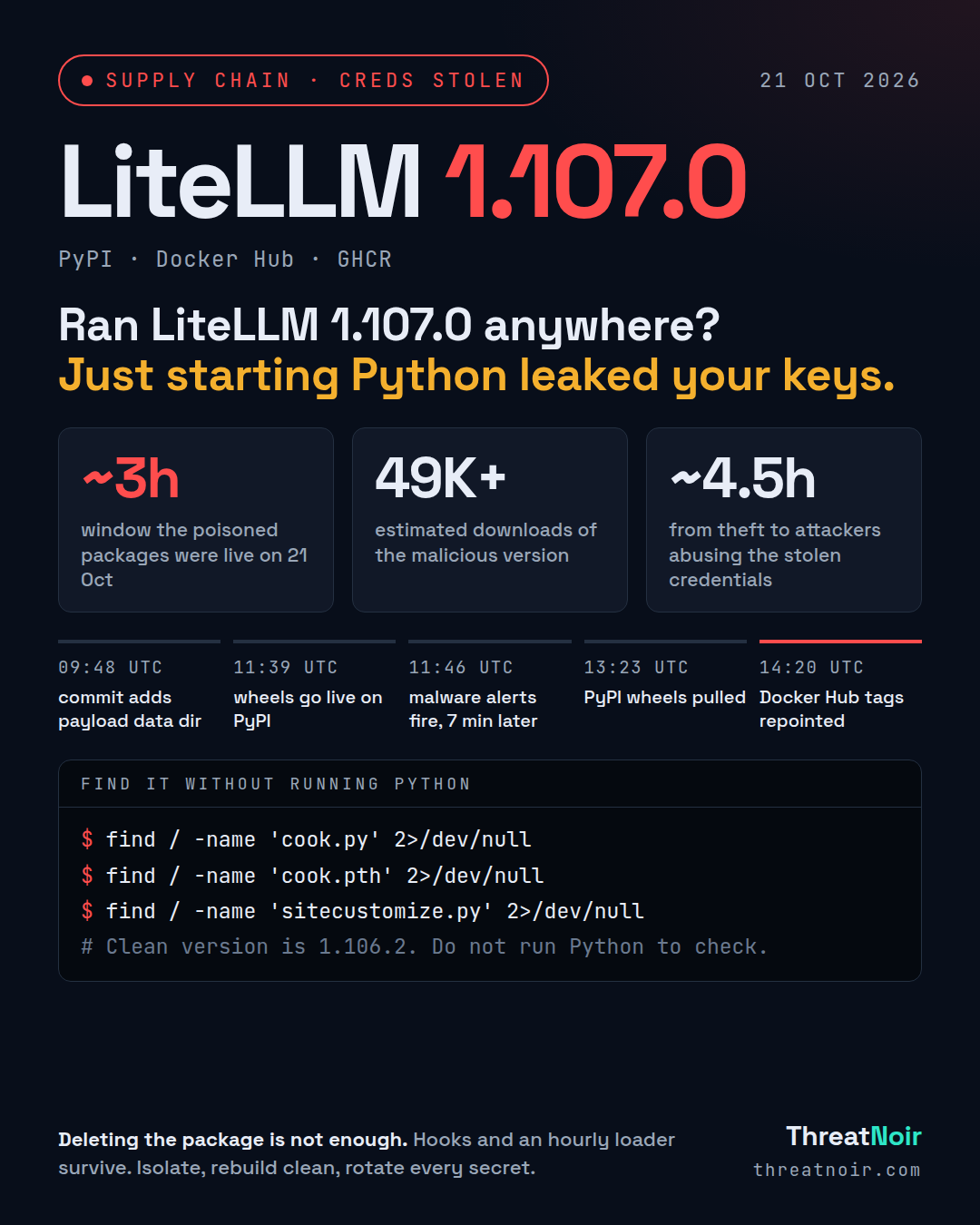
On 21 October 2026, attackers published a malicious LiteLLM version 1.107.0 to PyPI and to Docker Hub and GHCR. LiteLLM is a widely used proxy and SDK for routing requests across LLM providers, with about 92 million monthly PyPI downloads and users including NVIDIA, Netflix, AT&T and Okta.
The attackers did not touch the application code. They placed three files, cook.pth, cook.py and sitecustomize.py, into the Python library directory. When Python starts, it processes executable .pth lines and then imports sitecustomize, so the payload runs before any application imports LiteLLM. The payload is a credential stealer plus a remote access tool. Running Python or pip to inspect or repair an affected install also triggers it.
The stealer harvests cloud credentials (AWS, GCP, Azure, Kubernetes, Docker), AI tool keys (Anthropic, OpenAI, GitHub Copilot and more), LiteLLM's stored provider keys, Git, GitHub, npm, PyPI and CI/CD credentials, .env files, SSH, GPG and TLS keys, browser logins and cookies, environment variables and shell history. Stolen data is encrypted with AES-256-CBC under an RSA-4096 key and sent to litellm[.]dev/healthcheck. The sitecustomize.py loader checks a GitHub-hosted pointer every hour and runs whatever Python the attacker serves.
Per LiteLLM's post-mortem, the attackers obtained GitHub CLI OAuth tokens for an innocuously named account in its internal, internet-exposed deployment. The tokens were likely leaked into LiteLLM logs by Claude Code. The attackers disabled branch protections, merged a change pointing the releaser to a lookalike repository (Berri-AI/litellm, one hyphen off the real BerriAI/litellm), then signed and published the poisoned artifacts.
Timeline
- 09:48 UTC: commit adds the payload data directory to the build config.
- 10:51 to 11:06 UTC: malicious container build runs.
- 11:39:51 UTC: all seven wheels live on PyPI.
- 11:46 UTC: multiple scanners flag the malware, within minutes of publish.
- ~13:14 UTC: GHCR floating tags found resolving to the malicious image.
- 13:23 UTC: PyPI wheels removed.
- 13:51 UTC: GHCR images made unavailable.
- 14:20 UTC: Docker Hub tags repointed to clean artifacts.
Am I affected?
You are affected if, during the window on 21 October, you:
- Installed litellm 1.107.0 from PyPI (any of the seven wheels, on Windows, Linux or macOS).
- Pulled ghcr.io/berriai/litellm, litellm-database or litellm-non_root, or litellm/litellm on Docker Hub, by the tags v1.107.0, latest, main-latest or main-stable. Floating tags could have pulled the bad image without you selecting 1.107.0.
LiteLLM says enterprise customers pulling from its private repository were not affected.
What to do now
- Stop and isolate any deployment, proxy container or CI runner that ran 1.107.0. Do not start Python or pip in those environments to "check" them.
- Treat the host as compromised. Isolate it and rebuild from clean backups. Removing the LiteLLM package directory alone can leave the startup files or an active loader behind.
- Rotate every secret that touched the environment: AWS, GCP and Azure credentials, Kubernetes and Docker secrets, AI provider keys, Git and GitHub tokens, npm and PyPI tokens, CI/CD credentials, SSH, GPG and TLS keys, and database connection strings.
- Pin and redeploy from a known clean version: 1.106.2, the latest release before the attack.
- Pin Docker images by digest, not floating tags, after confirming the digest is clean.
How to hunt
- Search filesystems and images for cook.pth, cook.py and sitecustomize.py in the Python library directory. Inspect images and wheels as data, without executing them.
- Check outbound connections and logs for litellm[.]dev, in particular requests to /healthcheck.
- Review any Python process that set the environment variable PRIVCOLLECT_ACTIVE=1.
- For cloud accounts, review logs for unexpected activity. Wiz observed attackers using stolen AWS credentials to query Amazon Bedrock models (LLMjacking) about 4.5 hours after exfiltration.
- Check for the compromised image index sha256:1bbcb1443bc9… and the related database and non_root digests.
What does not help
- Deleting the litellm package directory on its own. The .pth and sitecustomize startup hooks or the hourly loader can persist.
- Reviewing the release tag's pyproject.toml. The malicious data setting was not present in the tag, so a tag-only review would miss it.
- Starting Python or pip to inspect the install. That re-runs the payload.
Sources
- LiteLLM PyPI Package and Docker Images Compromised to Steal Cloud and AI Credentials, SocketDev, 21 Oct
- LiteLLM Compromised in Fresh Supply Chain Attack, SecurityWeek, 23 Oct
- LiteLLM release pipeline hacked to distribute info-stealer malware, BleepingComputer, 22 Oct
- LiteLLM Compromised in Supply Chain Attack Delivering Credential Stealer and Backdoor, The Hacker News, 21 Oct
- LiteLLM Suspects GitHub Token Leak in AI Gateway Logs Behind Malicious Package Release, The Hacker News, 22 Oct