
What happened
On 17 November 2026, two malicious versions of Microsoft's agent-framework PyPI package were published: 1.26.1 and 1.26.2. Both carried a credential stealer. The package is the meta-package for Microsoft's Agent Framework for Python, so the machines most likely to install it are the ones holding Azure credentials worth stealing.
The malware installs as a Python .pth startup hook in site-packages. Python's site module reads .pth files on every interpreter start and runs any line beginning with import. That means the stealer fires whenever Python starts in that environment, even if nothing ever imports agent_framework. Running pytest, a build script, or pip itself is enough.
The releases were uploaded through the project's legitimate Microsoft publisher credentials, as a wheel only, with no trusted-publishing provenance and the user-agent RestSharp/106.13.0.0. There is no matching python-1.26.1 tag or malicious code in the GitHub repository. How the credentials were obtained is not confirmed.
Timeline
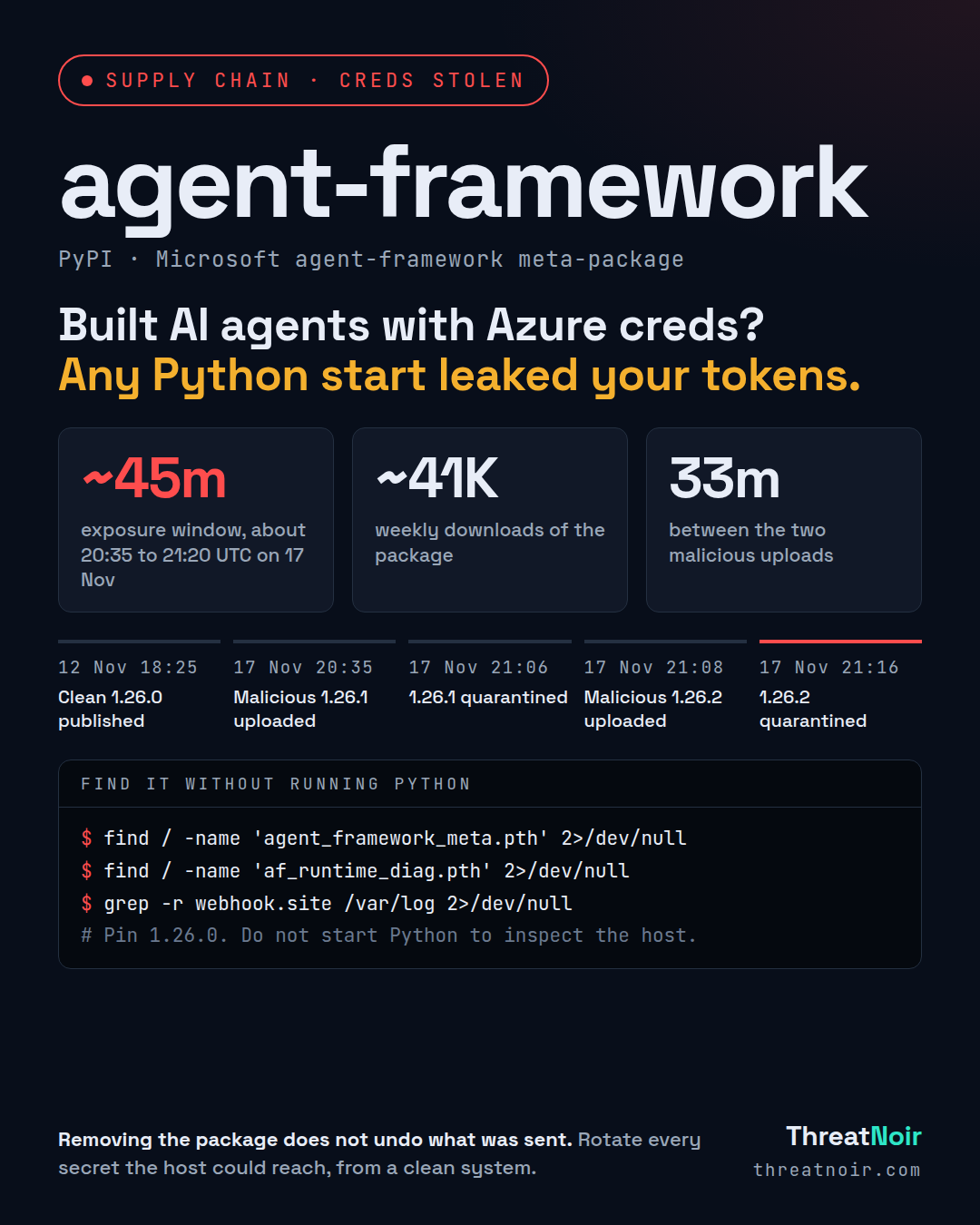
- 12 Nov 18:25 UTC: clean 1.26.0 published (wheel plus sdist).
- 17 Nov 20:35:20 UTC: malicious 1.26.1 uploaded.
- 17 Nov 21:06:16 UTC: 1.26.1 quarantined by PyPI.
- 17 Nov 21:08:39 UTC: malicious 1.26.2 uploaded, about 2 minutes 23 seconds after the first quarantine.
- 17 Nov 21:16:44 UTC: 1.26.2 quarantined.
The attacker's publishing access survived the first quarantine. That does not confirm the access remains available now.
Am I affected?
You are exposed if you installed agent-framework 1.26.1 or 1.26.2 between about 20:35 and 21:20 UTC on 17 Nov, directly or through a loose requirement like agent-framework>=1.26.
CI is where this hurts most. A pipeline or container build that resolved a fresh install during the window ran the stealer with whatever the job could reach. On Azure DevOps that means SYSTEM_ACCESSTOKEN and service connections. On GitHub Actions, 1.26.2 targets the OIDC token any workflow with id-token: write can request. Developer laptops and Azure VMs with a managed identity attached are exposed too.
The two versions leave different files behind. Checking only for 1.26.1's filenames will miss 1.26.2, which restored the legitimate initializer byte-for-byte and moved its code to a top-level af_runtime_diag.py.
What to do now
- Isolate any host or runner that installed either version before starting Python or pip on it.
- Search lockfiles, CI logs, virtualenvs, container images and package caches built since 17 Nov for 1.26.1 or 1.26.2.
- Look in
site-packagesforagent_framework_meta.pthandagent_framework_meta/_telemetry.py(1.26.1), oraf_runtime_diag.pthandaf_runtime_diag.py(1.26.2). Any Python process started there ran the payload. - Rebuild from a clean base image or dependency set and pin
agent-framework==1.26.0, the last clean release. - From a clean system, rotate every secret the environment could reach: Azure CLI sessions, Azure DevOps PATs and service connections, Azure service principal credentials, GitHub, npm, PyPI, NuGet, Docker and Hugging Face tokens, and git credentials.
- Audit Azure sign-in and activity logs for managed identities and federated credentials reachable from affected VMs, App Services, AKS nodes or ADO pipelines. Stolen managed-identity and OIDC-exchanged tokens are valid for up to 24 hours.
- For GitHub Actions jobs that installed 1.26.2 with
id-token: write, check Entra ID trust settings and sign-ins for the linked application.
How to hunt
Search proxy and DNS logs for webhook[.]site/d381fd80-ec62-42ad-8f5c-d1b15103c9bb (path ?t=telemetry). A 200 response means that host's data was accepted. A 410 or 429 suggests it was rejected: the free-tier endpoint caps at 100 requests. A domain connection alone does not confirm exfiltration.
Look for exfil user-agents af-runtime-diagnostics/1 (1.26.1) and runtime-diagnostics/1 (1.26.2), and for the run-once marker _AF_TEL=1. There is no persistent on-disk execution marker, so a fresh process tree can trigger collection again.
What does not help
Removing the package stops future runs but does not undo anything already sent. PyPI quarantine does not remove copies already installed or cached. Searching only for 1.26.1's filenames misses 1.26.2.
Sources
- Microsoft agent-framework PyPI Package Compromised, StepSecurity, 18 Nov
- Microsoft agent-framework Compromised: Credential Stealer Targets Azure and CI Pipelines, Wiz Research, 17 Nov
- Microsoft’s Agent Framework PyPI Package Hacked to Steal Azure and GitHub Credentials, Cyber Security News, 18 Nov
- Two malicious agent-framework releases hit PyPI in 33 minutes, Aikido Security, 17 Nov
- Microsoft’s agent-framework PyPI package Compromised with Credential Stealer, SocketDev, 17 Nov