
What happened
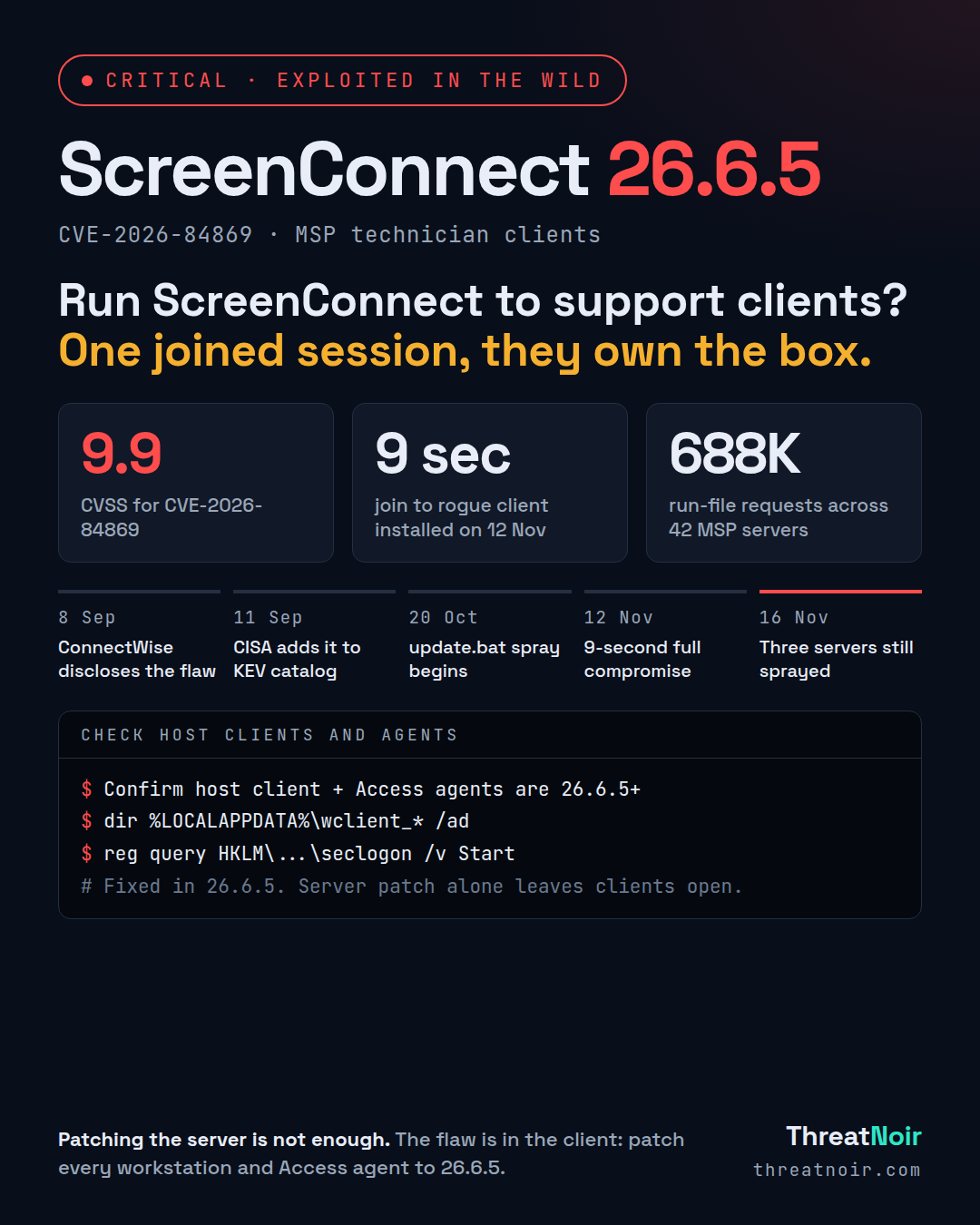
ConnectWise disclosed CVE-2026-84869 in ScreenConnect on 8 September 2026 with a CVSS score of 9.9. CISA added it to its Known Exploited Vulnerabilities catalogue on 11 September. The flaw is in how the technician host client handles guest file transfers in Support and Access sessions: a malicious guest can push a file to the technician's machine and get the technician's own client to run it, with elevated rights and no prompt. The technician only has to join the session.
Huntress has now confirmed exploitation in the wild. The target is the MSP technician workstation, which typically holds RMM consoles, saved credentials and access to every customer.
Timeline
- 8 Sep 2026: ConnectWise discloses CVE-2026-84869 (CVSS 9.9).
- 11 Sep 2026: CISA adds it to the KEV catalogue.
- 20 Oct to 16 Nov 2026: attacker guests make about 688,000 run-file requests for update.bat style files across 42 MSP ScreenConnect servers, from 29 source IPs.
- 12 Nov 16:46 UTC: a technician joins a blank-named Access session; a guest-pushed update_224ac089.bat runs and a rogue ScreenConnect client is installed in about 9 seconds.
- 13 Nov 01:49 UTC: a guest pushes marker.txt to a second technician as an execution test.
- 16 Nov: three servers still receiving the spray.
Am I affected?
You are at risk if you run ScreenConnect host clients or Access agents below 26.6.5 and your technicians join Support or Access sessions. The server does not need to be exploitable: the vulnerable code is on the technician's workstation. If technicians have joined any unnamed, blank or oddly named sessions recently, treat those workstations as suspect.
In the observed compromise, the script relaunched itself hidden via PowerShell and WScript.Shell, reported to a Telegram bot, ran recon (reg query, net session), then used curl to download WindowsUpdate.msi from masterdarky[.]com. msiexec unpacked it as an administrative image (TARGETDIR under %LOCALAPPDATA%\wclient_<8hex>), which leaves no install record. The payload WindowsUpdate.WindowsClient.exe is a rebranded ScreenConnect client connecting to the attacker's relay on port 8041.
What to do now
- Update every technician host client and affected Access agent to 26.6.5 or later. Updating the server alone does not fix the vulnerable client software.
- If you cannot patch immediately, remove the TransferFiles permission from roles and session groups, as ConnectWise recommends.
- Review your ScreenConnect server for unauthorized guest sessions, especially blank names, default-looking Windows hostnames, empty guest public keys, or Company property (CustomProperty1) set to "crypto client". Remove them.
- On any workstation that joined a suspect session, isolate it, remove unauthorized clients, and rotate reachable management, vault and customer administrator credentials.
How to hunt
- Look for guest-originated run-file and file-transfer events in the server database for files named update.bat or update_<8hex>.bat, then check whether a technician was connected at the same time.
- On workstations, look for a folder under %LOCALAPPDATA%\wclient_<8hex> and a file wupdate_<8hex>.msi in %TEMP%.
- Look for ScreenConnect spawning a batch script, hidden PowerShell, csc.exe compiling an Add-Type, and sc config seclogon / net start seclogon.
- Check for Startup persistence: Sync.bat in the Startup folder via a traversal path, plus guest-pushed files marker.txt, Run-Lateral.bat and svc_payload.cmd.
- Block and alert on masterdarky[.]com, relay port 8041, and hosting IP 194.15.36[.]33. The rogue client SHA-256 is f8871b1561d5c77c297378a7f49c84de52a01ff297395544f0e95d13ef972841.
What does not help
Patching only the ScreenConnect server does not help: the flaw is in the technician host client, so every technician workstation and Access agent must reach 26.6.5. Note the SCKit relay campaign is a separate third-party extension abuse, not direct exploitation of this CVE, so fixing the extension does not substitute for patching clients.
Sources
- CVE-2026-84869 in ScreenConnect Exploited to Run Malicious Files on MSP Technician Accounts, Huntress, 16 Nov
- Hackers Exploit Critical ScreenConnect Flaw to Silently Run Malware on MSP Technicians’ Computers, Cyber Security News, 17 Nov